
Location map
Display up to four location pins in an interactive Google Maps embed.
Location map example


When to use a location map
The location map can be used to embed an interactive Google Maps location on a page. It usually features in website sections like Accommodation and Campus and Facilities pages, where location information is helpful to the user.
To use the location map you will need to have a primary location that you want to act as a central point to the map. You can then add up to four additional pins showing nearby points of interest.
For each pin added, you can also add a description and a link to 'get directions'. This information will appear next to the map in a copy section.
How to use a location map
Recommended word count
The location descriptions should be kept as short as possible to fit into the limited space, especially if the maximum number of locations pins have been used.
|
Location description |
50 words maximum |
Notes on component usage
- Location pins are added to this component by longitude and latitude. This information can be found in Google Maps by right-clicking a location pin. For example, for Frenchay Campus East Entrance, the longitude and latitude is 51.50031, -254497.
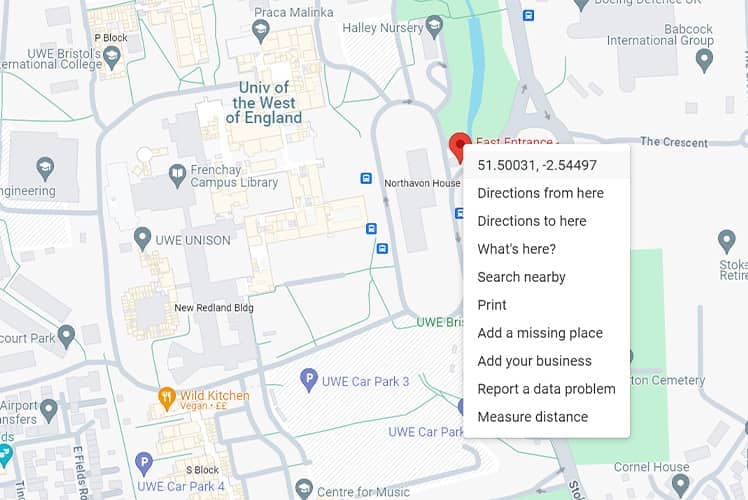
- When adding multiple location pins, 'get directions' should always link back to Google Maps. For example, for Frenchay Campus East Entrance the link would be: get directions.