
Multi-column links
A list of multiple links displayed over two or three columns.
Multi column links example


When to use multi-column links
The multi-column links component can be used to display a group of links in multiple columns. It's best used when you need to display a long list of links in a concise way.
You can populate two or three columns and spread the links out horizontally on the page. On mobile, the columns will stack and display the links in a single column structure.
If you need to include short descriptions or images alongside links, you may want to consider using a manual block of cards instead.
How to use multi-column links
In Sitecore, you populate each column individually. 'Multi column links column one' appears on the left, and so on.
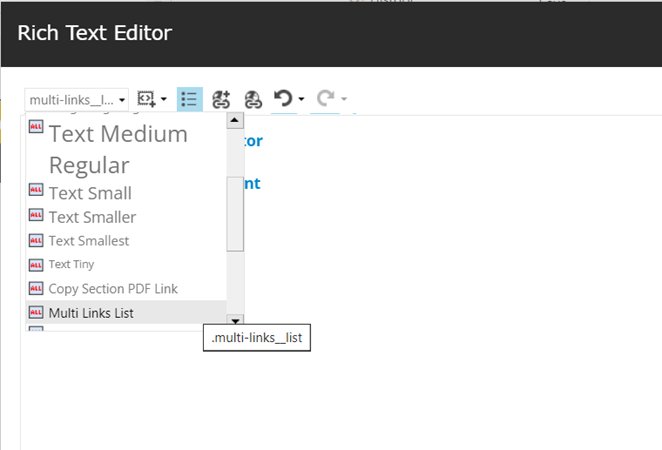
The styling on the link text is assigned through the rich text editor:
1. Highlight the link text.
2. Under the Apply CSS Class drop down select the 'Multi Links List' class.
Recommended word count
|
Link text |
50 characters maximum |
Notes on component usage
- It is important to preview the page before publishing to check whether the columns are balanced – this is especially important if you have any long link text that runs over two lines. Previewing can also help you determine whether you need two or three columns of links.
- When a multi column links component is updated and links are added or removed, the columns will need to be reviewed again.